
The Essential Guide to Bluebeam Revu for Modern AEC Teams
Bluebeam Revu has truly become a must-have for architects, engineers, and construction pros dealing with intricate PDF drawings and project documents. Whether it’s for design reviews, quantity takeoffs, or real-time collaboration on-site, Bluebeam empowers AEC teams to speed up their work, minimize mistakes, and keep everyone on the same page.
However, even with its popularity, many teams tap into only a fraction of what Bluebeam offers. I have been using Bluebeam for the past four years, but I haven’t fully explored its capabilities. Out of curiosity, I began learning more about Bluebeam and have created these blog posts to share my findings with you.
Whether you’re just starting with Bluebeam or aiming to maximize the benefits of your current setup, this comprehensive post will show you how to make the most of Bluebeam on every project.
What is Bluebeam Revu?
Bluebeam Revu is a professional-grade platform for creating, marking up, and collaborating on PDFs, specifically designed for the architecture, engineering, and construction (AEC) sectors. It empowers teams to review drawings, add precise markups, take measurements, and collaborate on project documents all within a single, centralized environment.
Established in 2002 in Pasadena, California, Bluebeam was founded with a clear goal: to enhance the way AEC professionals interact with PDFs throughout the project lifecycle. In 2014, the company became part of the Nemetschek SE Group, which further bolstered its presence in the global ecosystem of leading AEC technology solutions.
Today, Bluebeam is fully committed to construction software and digital collaboration, serving over three million professionals worldwide, who depend on its tools to work more efficiently, accurately, and confidently.
Who is Bluebeam built for?
- Architects reviewing design intent and drawing sets
- Engineers coordinating technical changes across disciplines
- Contractors managing construction documents and markups
- Estimators performing accurate quantity takeoffs
- Project managers tracking reviews, comments, and approvals
Why is Bluebeam considered the industry standard?
Bluebeam Revu has earned its reputation as the go-to choice in the industry because it was specifically designed for AEC workflows long before most generic PDF tools hit the market. Its precise measurement tools, customizable markups, and real-time collaboration features through Bluebeam Studio really set it apart from standard PDF editors.
Over the years, Bluebeam has become a staple in construction workflows, training initiatives, and company standards, creating a shared language among project teams. When multiple stakeholders are already on the same platform, working together becomes faster, easier, and significantly less error-prone.
Problems Bluebeam solves:
- Inconsistent markups across teams
- Difficulty tracking comments and revisions
- Manual takeoffs and measurement errors
- Slow RFI and review workflows
Understanding the User Interface of Bluebeam Revu
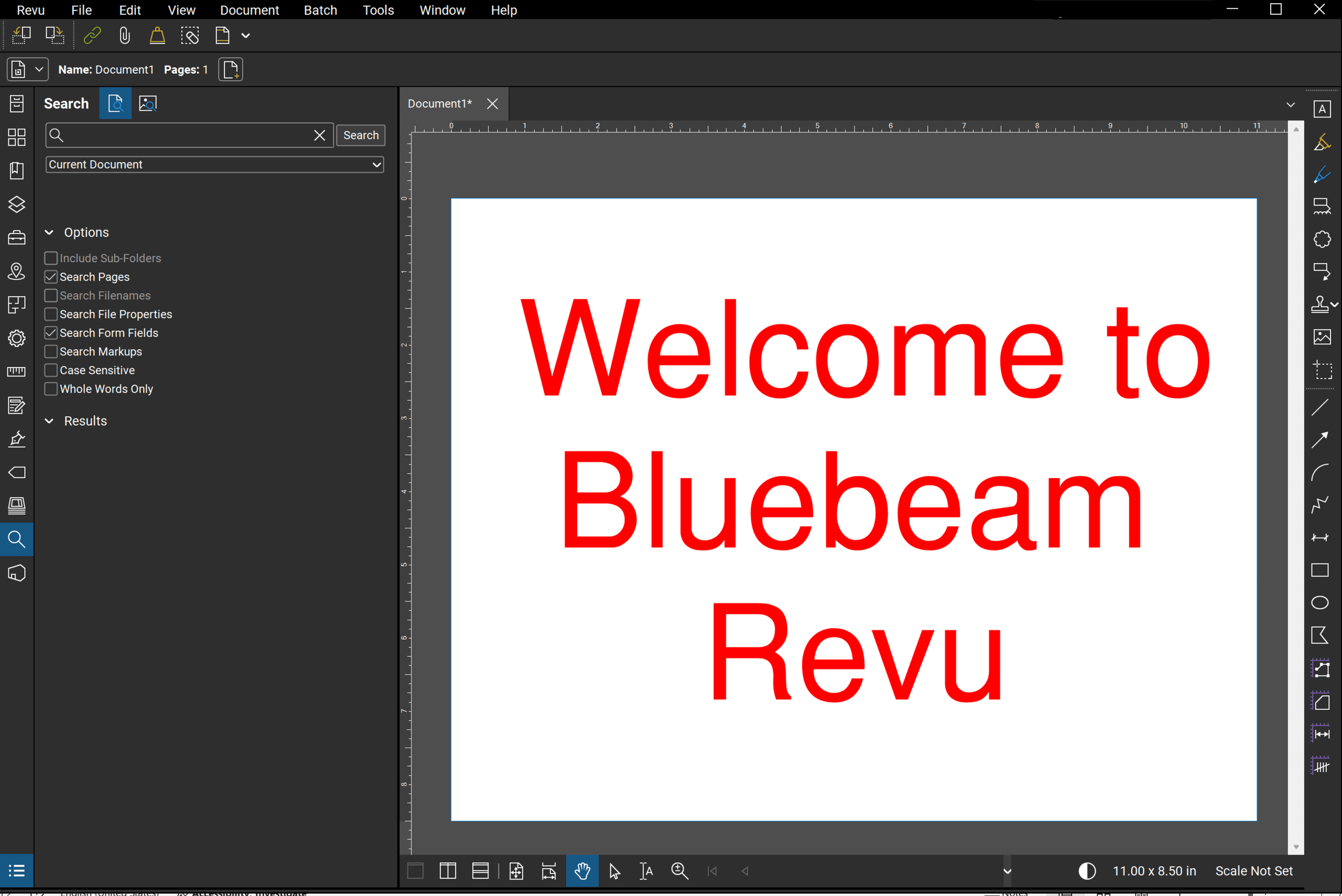
Bluebeam Revu features a purpose-built user interface designed for working with large drawing sets and technical PDFs.
The Bluebeam interface is organized around toolbars at the top, panels on the sides, and the document workspace at the center.
Key panels, such as the Tool Chest, Properties, and Markups List, are docked for quick access. This layout allows users to customize their workspace based on role and task.
For a detailed walkthrough of each panel and control, explore this dedicated UI guide on our blog.
Core Features of Bluebeam Revu
Bluebeam Revu includes a wide range of tools and features that cover the full lifecycle of PDF documents in AEC projects.
| Menu | Features |
|---|---|
| File | The File tab contains core actions for opening, saving, printing, and exporting PDFs. It also includes options for creating new PDFs, combining files, and accessing recently opened documents. |
| Edit | The Edit tab provides tools for modifying existing content, including text, images, and markups. Users can cut, copy, paste, multiply, and select to maintain clean and consistent drawings. |
| View | The View tab controls how documents are displayed and navigated. It includes options for zooming, rotating pages, managing panels, and switching between different viewing modes. |
| Document | The Document tab focuses on managing PDF structure and properties. Users can insert, delete, reorder, rotate pages, and much more. |
| Batch | The Batch tab enables users to apply actions across multiple files at once. Common batch tools include Crop & Page Setup, Rotate Pages, and Split Documents to save time on repetitive tasks. |
| Tools | The Tools tab contains Bluebeam’s core markup, measurement, and annotation tools. |
| Window | The Window tab controls how Bluebeam Revu is displayed and how users manage their workspace. It includes options for switching between window modes (full screen or presentation), managing panels and tabs, opening WebTabs, keeping Revu always on top, and arranging the interface for focused or multi-document work. |
How Bluebeam Revu benefits Different Roles?
From design reviews to construction coordination, Bluebeam Revu is a versatile tool that supports a variety of roles across the AEC industry. The table below showcases how different professionals leverage Bluebeam to enhance their daily workflows.
| Role | How Bluebeam Revu is Used? |
|---|---|
| Role | How Bluebeam Revu Is Used |
| Admin | User management, standards enforcement, profiles, and workflow setup |
| Architects | Design reviews, coordination, and visual markups across drawing sets |
| Engineers | Technical verification, measurements, and drawing revisions |
| Estimators | Quantity takeoffs, measurements, and cost-related calculations |
| Manager / Support Team | Template creation, tool standardization, and internal support |
| General Contractor | Document coordination, revision control, and subcontractor collaboration |
| Government / Municipal | Plan review, compliance checks, and secure document workflows |
| Project Managers | Review tracking, coordination, and reporting across teams |
| Subcontractor | Mobile drawing access, punch lists, and cloud-based collaboration |
Bluebeam Revu Pricing
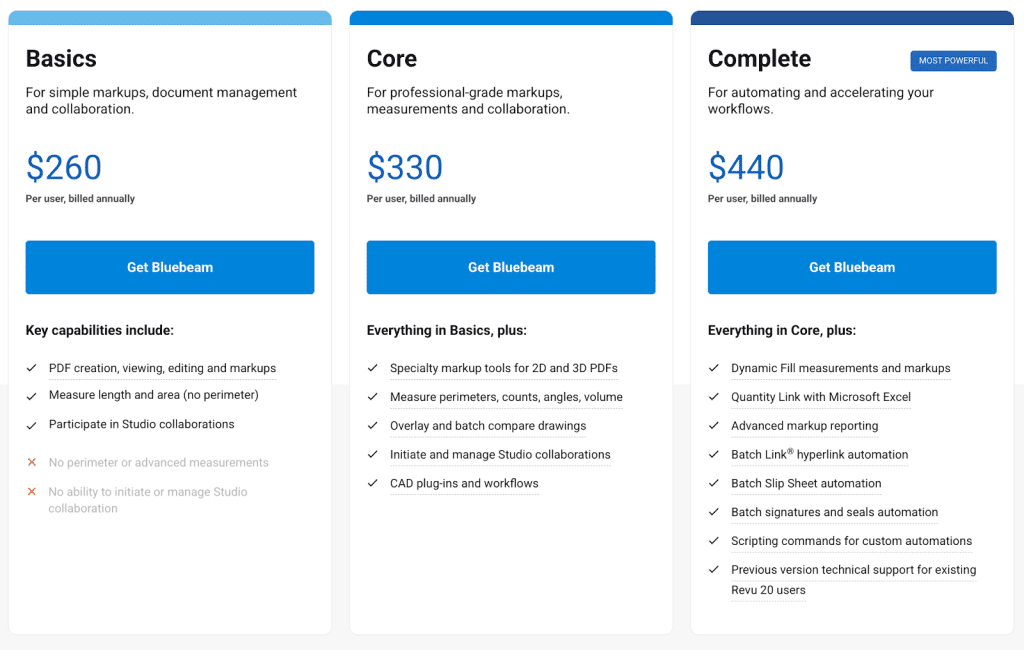
Bluebeam Revu uses a subscription-based pricing model with three tiers designed to fit different workflows and team needs. The three tiers are Basics, Core, and Complete. A detailed breakdown of features available in each tier is available on the official Bluebeam pricing page.
Bluebeam Revu has established itself as a key player for AEC professionals, offering a blend of powerful PDF markup, precise measurements, and real-time collaboration all in one place. When configured and utilized correctly, it helps teams minimize errors, enhance coordination, and drive projects forward more efficiently. Whether you’re just starting out, or perfecting your advanced workflows, Bluebeam is a solid foundation for modern construction documentation.
